
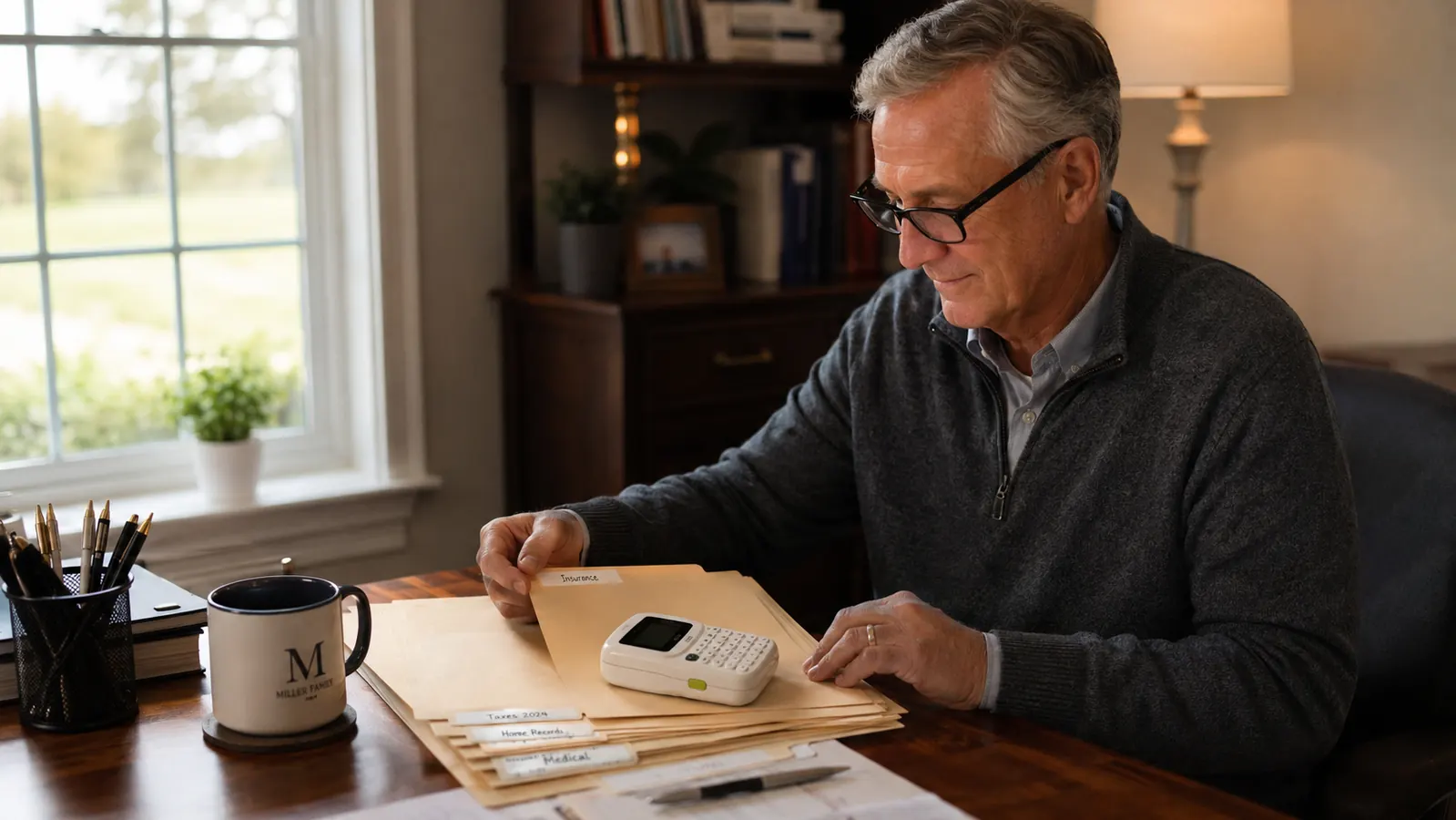
I did not expect a label maker to change how my home office felt, but that is what happened. I bought the DYMO LetraTag handheld label maker in January because I could not find the right charging cable behind my desk one more time, and six months later it has worked its way through my file cabinet, my supply closet, and yes, part of the kitchen pantry too.
This is not a rave review. I have hit a few annoyances along the way, and I will name them plainly. But if you work from a spare bedroom or a corner of the living room like I do, and your paperwork and cords have started to blend into one pile, this little DYMO machine earned its spot on my desk, and I think it will earn its spot on yours too.
The Quick Verdict
A genuinely useful, no-frills labeler that has held up to six months of daily home office use. The tape cost adds up, and the small screen takes getting used to, but the DYMO name on the box turned out to mean something.
Amazon Check Today's Price →Tired of the drawer where cables go to disappear?
This is the exact DYMO label maker I have been using since January. If your home office has a junk drawer problem, this is where I would start.
Amazon Check Today's Price on Amazon →How I've Used It
My home office is a converted spare bedroom with a metal two-drawer file cabinet, a shelf of banker's boxes, and a desk with four devices plugged into one power strip. Before this DYMO label maker showed up, every one of those things looked identical to every other thing. I labeled my first batch of folders (tax records, warranty paperwork, old pay stubs) within the first hour of opening the box, and I have used it at least once a week since, which for a household gadget is a fairly high bar to clear.
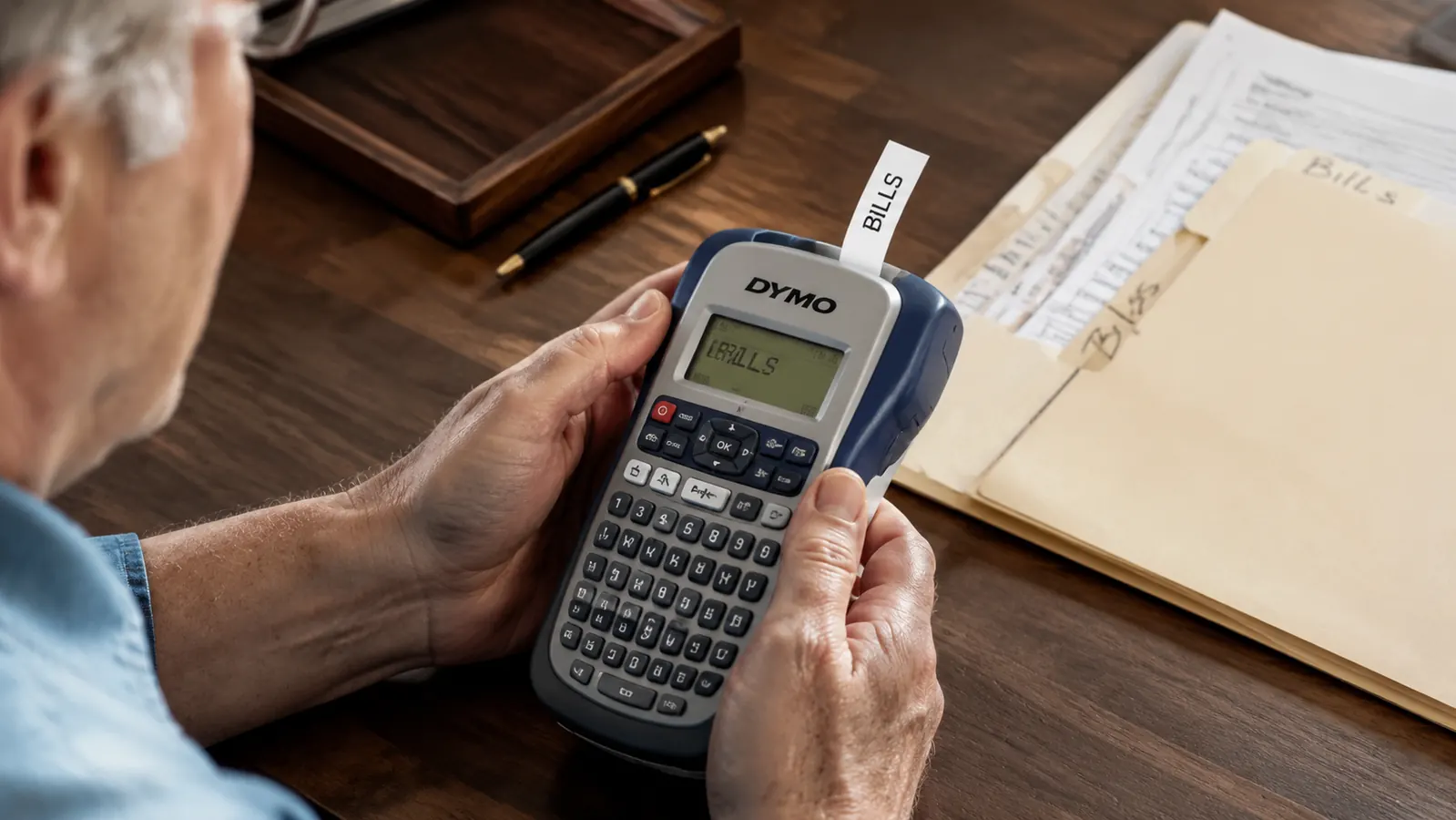
The routine settled in fast. Turn it on, thumb through the letter wheel or type on the small keypad depending on which version you grabbed, hit print, peel, stick. I timed myself once out of curiosity and a short label, something like FILE 2024 TAXES, took under 20 seconds start to finish. That speed is the whole reason I still reach for it instead of writing on masking tape with a Sharpie, which is what I did for the two years before this, and honestly what a lot of home offices I have seen still rely on.
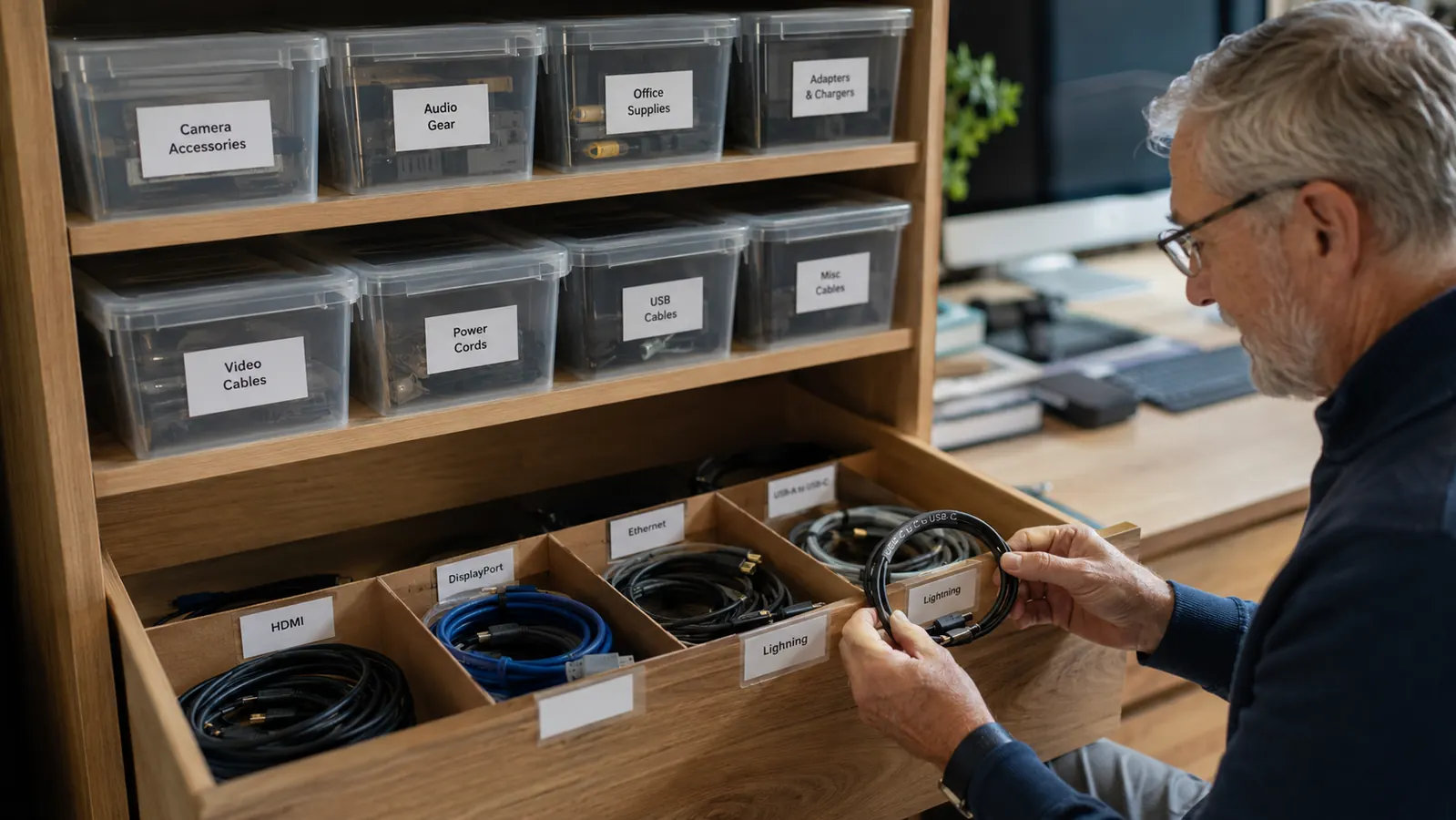
By month three I had moved on to cords. Each charging cable behind my desk now has a small paper flag around it that says what it charges, phone, tablet, monitor, and unplugging the wrong thing by accident basically stopped happening. That one change alone, small as it sounds, is probably what I would tell a friend first if they asked whether this DYMO label maker was worth it, because it solved a daily annoyance rather than a once-a-year project.
By month five the labeling had spread outside the office entirely. My spice rack, a shelf of extension cords in the garage, and the plastic bins where we keep holiday decorations all got the same treatment. I bring this up not to pad the review but because it changed how I think about the purchase. This is not really a home office tool that happens to work elsewhere, it is a general household organizer that happens to be genuinely great for a desk setup, and that versatility is part of why it earned back its cost quickly in my mind.
The Print Quality and How It Held Up
The text this DYMO label maker prints is small but sharp. I have labels from the very first week still stuck to file folders and they have not smudged, faded, or peeled at the corners, even the ones near a window that gets afternoon sun. That surprised me a little, because I expected the adhesive to weaken after a few months of temperature swings in an office that does not always get climate controlled evenly, especially in the summer when that spare bedroom gets warm by early afternoon.
Where it struggles is on curved or textured surfaces. I tried labeling a canvas storage bin early on and the label lifted at one edge within a week. On flat plastic, metal file cabinet drawers, or smooth cardboard boxes, it has stayed put with zero issues. If you plan to label fabric bins, know that going in and maybe reinforce the edge with a strip of clear tape, which is the workaround I eventually landed on for the two canvas bins I still needed labeled.
The one mechanical hiccup I have had was a tape jam around month four, caused entirely by me feeding in a slightly bent cartridge. A few seconds of gently working the tape back out fixed it, and it has not happened again since. Not a flaw in the machine so much as a lesson in checking your tape cartridge before loading it, something the included instructions actually warn about and I skimmed past the first time.
Battery Life and the Real Cost of Tape
This runs on AAA batteries, and the original set lasted just over four months of my weekly-ish use before dying. That is reasonable, but worth knowing if you were picturing something rechargeable out of the box, because it is not. I now keep a spare set of batteries in the same drawer as the extra tape cartridges so I am never mid-label when it dies on a Sunday afternoon when the stores are closed.
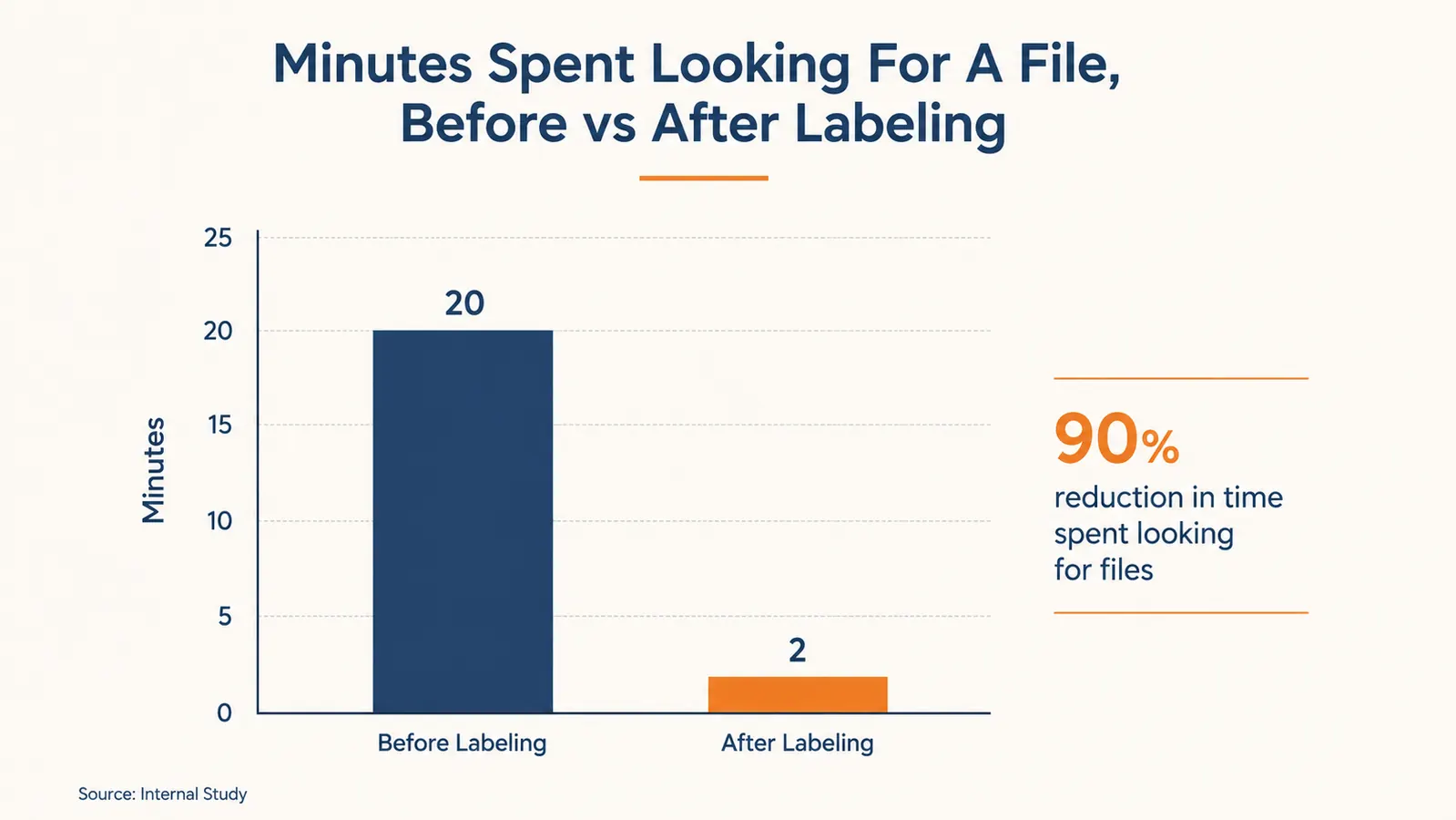
Tape is the part nobody mentions until they own one. A single cartridge is not expensive on its own, but if you get into a labeling habit like I did, you will burn through a cartridge faster than you expect, especially once you start labeling individual cords and small bins instead of just big folders. Over six months I have gone through four cartridges. It is not a dealbreaker, just a real ongoing cost that I factor in now before recommending this DYMO label maker to anyone who asks.
If you are the type who labels in short bursts, one afternoon a month cleaning out a drawer, the tape cost will feel like nothing. If you are like me and end up labeling something new every week once you get going, budget for refills the same way you would budget for printer ink. It is a small line item, but it is a real one, and I would rather tell you that up front than let you find out later.
Who Uses This the Most in My House
My husband, who works from the same room two days a week, was skeptical at first and now uses it more than I do for labeling his tool bins in the garage. That tells me this thing is not just a home office gadget, it is closer to a general household organizing tool that happens to be great for a desk setup specifically, and that crossover use is part of what has kept it charged and within reach instead of buried in a drawer somewhere.
For a home office in particular, the sweet spot has been file folders, cord management, and small storage bins for printer paper, spare cables, and shipping supplies. Anyone doing freelance work, running a small side business out of their house, or just trying to keep client paperwork straight would get real use out of this DYMO label maker within the first week, and I think that first week is usually enough to tell whether it earns a permanent spot on your desk.
What I Liked
- Print quality has held up sharp and legible for six months with no fading
- Fast enough that I actually use it instead of a Sharpie and tape
- Labels stick firmly to flat surfaces like file folders and metal cabinets
- Simple enough that my husband picked it up with no instructions
- Small enough to keep in a desk drawer, does not take up counter space
Where It Falls Short
- Tape cartridges cost more over time than I expected when I first bought it
- Labels lift at the edges on curved or fabric surfaces
- Runs on AAA batteries only, no rechargeable option on this model
- Small display or letter wheel takes a session or two to get comfortable with
The moment it earned its keep was not the big filing cabinet overhaul, it was the small paper flag on a charging cable that meant I stopped unplugging the wrong thing at 6am.
Alternatives I Considered First
Before buying, I looked at a couple of phone-connected label makers that print through a bluetooth app, since a few friends recommended them for the fancier fonts and icon options. I skipped those for two reasons: I did not want another app on my phone, and I have read enough reviews of connected gadgets losing bluetooth pairing to know that is a hassle I did not want in my home office. A machine with physical buttons that just works felt like the safer bet for someone who wanted this to be a five-minute task, not a ten-minute one spent troubleshooting a connection.
I also considered just handwriting labels, which is what I did for years. It is free, but my handwriting is inconsistent, and on a small file folder tab there is not much room for error. Once I compared a handwritten label next to a printed one side by side, the difference in how professional my file cabinet looked was obvious enough that I have not gone back, and honestly I have not missed the Sharpie at all.
What I Wish I Had Known Before Buying
If I could go back and tell myself one thing, it would be to buy an extra tape cartridge or two at the same time as the machine, rather than waiting until I ran out mid-project. There is nothing worse than getting into a labeling groove on a Saturday morning and running dry halfway through the filing cabinet. It is a small thing, but it saved me a second trip to the store the next time I stocked up.
The second thing is smaller but still worth saying: label everything the same day you decide to start a project, not in stages. I made the mistake early on of labeling half my file cabinet one weekend and telling myself I would finish the rest later. Later took almost a month, and in the meantime I had a cabinet that was half organized and half not, which somehow felt more frustrating than when nothing was labeled at all. If you are going to commit to this DYMO label maker, block out one afternoon and finish the whole drawer, shelf, or bin set in one sitting.
Who This Is For
If you work from home even part time and your desk, file cabinet, or cord situation has started to feel like a junk drawer, this DYMO label maker is worth the modest investment. It is especially good for anyone who likes a visual, tactile kind of organizing, seeing a labeled folder actually feels different than seeing a messy one, at least it does for me, and it seems to for my husband too.
Who Should Skip It
If you already have a system that works, color coded folders, a label printer at the office you can borrow, or you simply do not label things often enough to justify buying tape refills, save your money. This is a tool for people who label regularly, not for a once-a-year project. And if most of what you would label is curved or fabric, you may want to research a model built specifically for those surfaces instead.
Six months in, it is still on my desk every week.
If your home office needs the same kind of small, unglamorous fix, this is the label maker I would point you toward.
Amazon Check Today's Price on Amazon →